Best Prompt Managers for Chrome in 2026
Stop losing your best AI prompts. We've tested the top 5 Chrome extensions that save, organize, and inject prompts "then show you which one fits your workflow.
If you've written the same ChatGPT prompt twice, you're ready for a prompt manager. These extensions live in your browser, save every instruction you write, and inject them into ChatGPT, Claude, or Gemini with one click.
We'll compare features, pricing, and the critical difference between "local-first" (your data stays on your device) and "cloud-first" (everything syncs to a server by default).
The 5 Best Prompt Managers for Chrome
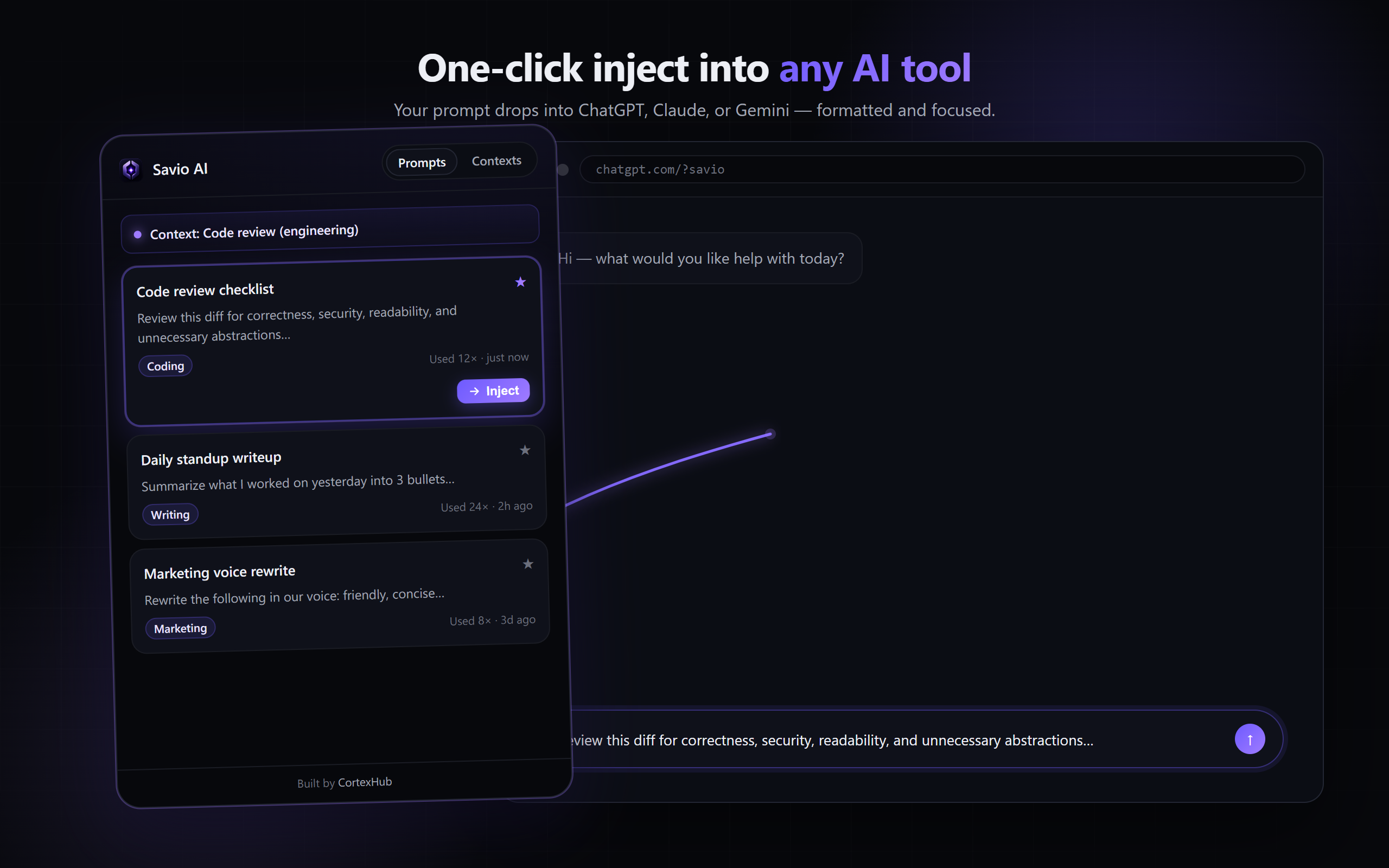
The youngest and most focused prompt manager. Built for solo users and small teams who want local-first storage with optional cloud sync for the Pro tier.
- Local-first by default: prompts never touch a server unless you pay for Pro
- No account required: works fully offline and anon
- One-click inject into ChatGPT, Claude, Gemini
- Context profiles: reusable tone/style rules that prepend any prompt
- Fast: search and inject in under 2 seconds
- Usage tracking: see which prompts you actually use
- Full JSON export: take your data anytime
- Keyboard shortcut: Ctrl+Shift+Y anywhere
- Free tier capped at 20 prompts and 3 context profiles
- No team sharing in current release
- Newest option (smallest user base, but fastest iteration)
A marketplace + manager hybrid. Save your own prompts, but the value pitch is access to a library of community-shared prompts across ChatGPT, Midjourney, and Stable Diffusion.
- Huge community library (100k+ shared prompts)
- Cross-tool (ChatGPT, Midjourney, Stable Diffusion)
- Free tier is genuinely useful
- One-click inject like Savio
- Cloud-first: your prompts are synced to their servers by default
- Marketplace can feel cluttered vs. personal vault focus
- Free tier limited to 50 saved prompts
- Privacy: requires account
Community-first prompt library (similar to PromptHero). Strong on discovery and sharing; weaker on personal vault management.
- Strong community (trending prompts, awards, leaderboard)
- Mobile app available
- Free tier is accessible
- Cloud-default, requires account
- Heavy emphasis on social/sharing can distract from personal productivity
- Weaker one-click inject workflow
OpenAI's native feature. One text field per chat that auto-prepends your instructions. Not a full prompt vault, but zero friction to set up.
- Zero friction: built into ChatGPT
- No extension to install
- Automatic across all chats
- Only one set of instructions (can't swap between "marketing voice" and "code reviewer")
- No reusable prompt library
- No one-click inject
- Can't apply to Claude or Gemini
Not a dedicated tool, but Notion databases can organize prompts with search, tagging, and filtering. Requires manual copy/paste to ChatGPT.
- Maximum flexibility (fully customizable)
- Works for team sharing
- Integrates with your existing workspace
- Slow: requires copying from Notion, pasting into ChatGPT
- No one-click inject
- Requires account and manual database setup
- Takes 3-4 minutes per use vs. 2 seconds with a dedicated extension
Quick Comparison Table
| Feature | Savio AI | PromptHero | FlowGPT | Custom Instructions |
|---|---|---|---|---|
| Local-first (no servers by default) | ✓ | ✗ | ✗ | ✓ |
| No account required | ✓ | ✗ | ✗ | ✗ |
| One-click inject | ✓ | ✓ | ✓ | ✗ |
| Works with ChatGPT, Claude, Gemini | ✓ | ✗ | ✗ | ✗ |
| Context profiles (swap tone/style) | ✓ | ✗ | ✗ | ✓ |
| Cloud sync for multi-device | ✓ (Pro) | ✓ | ✓ | ✓ |
| Community library | ✗ | ✓ | ✓ | ✗ |
| Team sharing | ✗ | ✗ | ✗ | ✓ |
| Free tier | 25 prompts | 50 prompts | Yes | ChatGPT Plus |
How to Choose
Choose Savio AI if:
- You want your data to stay on your device (not synced to a company server by default)
- You use multiple AI tools (ChatGPT, Claude, Gemini) and want one prompt library for all
- You value speed: inject a prompt in 2 seconds, not 3-4 minutes
- You like context profiles (reusable tone + style rules)
- You want a free tier with real limits, no upsell pressure
Choose PromptHero or FlowGPT if:
- You want inspiration from a large community prompt library
- You're willing to create an account and sync to their servers
- You mainly use ChatGPT (less support for Claude/Gemini)
Choose ChatGPT Custom Instructions if:
- You only use ChatGPT and have 1-2 global rules
- You don't need a library: just one set of instructions that apply everywhere
- You want zero friction (built-in to ChatGPT)
Choose Notion if:
- You have a team that needs shared access and deep customization
- You're willing to sacrifice speed for flexibility
- You already live in Notion
Privacy & Data Handling
Savio AI: Local-first. Free users: 100% on your device. Pro users: opt-in cloud sync with Row Level Security (per-user isolation). No telemetry.
PromptHero / FlowGPT: Cloud-default. All prompts synced to company servers. Review their privacy policy.
ChatGPT Custom Instructions: Synced to OpenAI's servers (like all ChatGPT data). Subject to OpenAI's privacy policy.
Notion: Synced to Notion's cloud. Subject to Notion's privacy policy.
FAQ
Q: Do these tools work on Firefox or Safari?
A: Most prompt managers are Chrome-only (Chromium-based: Chrome, Brave, Edge, Arc). Notion works everywhere.
Q: Can I export my prompts if I want to switch later?
A: Yes with Savio AI (full JSON export). Check each tool's export policy before committing.
Q: Are prompt managers worth it if I only use ChatGPT once a week?
A: Probably not. Custom Instructions alone is free and sufficient. Prompt managers shine if you write 5+ ChatGPT prompts per week.
Q: Can I use multiple prompt managers at the same time?
A: Yes, but it defeats the purpose. Pick one and commit to it for 2-4 weeks to build the habit.